Why Google Maps Doesn’t Work Well in Korea (And What to Use Instead)
If you just moved to Korea or you’re visiting for a while, you’ll probably open Google Maps out of habit and get frustrated pretty quickly. Driving directions are often missing, business listings are outdated, and real-time traffic just isn’t there. This isn’t a bug — Korea restricts detailed map data from leaving the country for security reasons, so Google has never been able to build out full navigation here the way it has elsewhere.
Kakao Map and Kakao Navi are the two apps most people use instead: Kakao Navi for driving, and Kakao Map for everything else — subway, bus, taxi, walking. Both are part of the Kakao ecosystem, the same company behind KakaoTalk, which you’ll already have on your phone. The one catch is that neither app was designed with English speakers in mind, so getting them set up takes a few extra steps. Here’s exactly how to do it.
Table of Contents
Kakao Navi: Getting English Voice Guidance
Kakao Navi is built for driving, and it’s genuinely good at it — accurate real-time traffic, smart rerouting around jams, the works. The menus themselves stay in Korean no matter what, but you can switch the spoken turn-by-turn guidance to English, which honestly is the part that matters most when you’re behind the wheel.
Here’s the path:
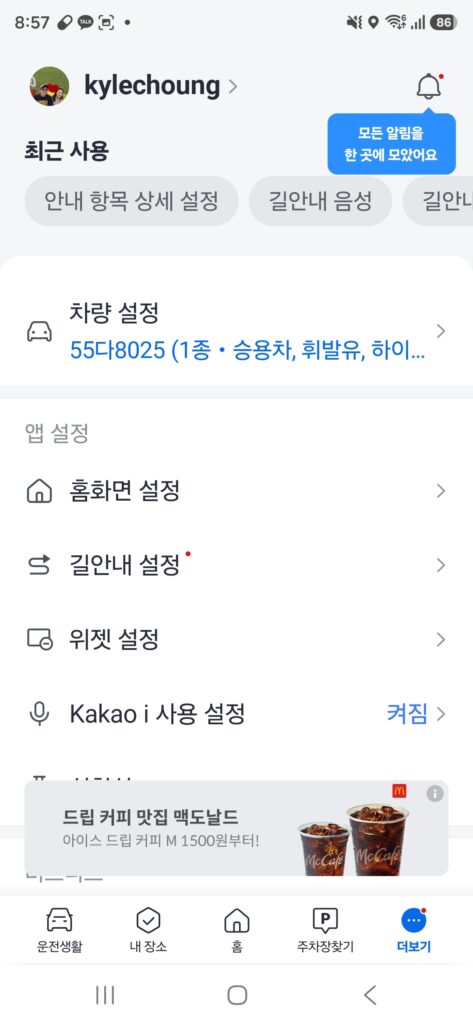
- Open the app and tap into the “More” menu (더보기) in the bottom right. You’ll see options like Home Screen Settings (홈화면 설정) and Navigation Settings (길안내 설정) with a small red dot showing something’s new there.
- Tap Navigation Settings (길안내 설정).
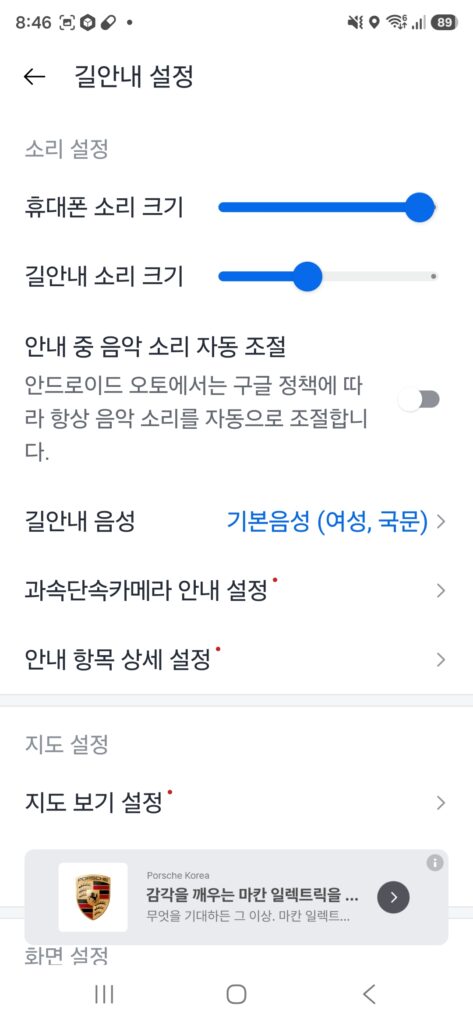
This opens the guidance settings screen. Near the top you’ll see Guide Voice (길안내 음성), and by default it’s set to the standard Korean female voice (기본음성, 여성, 국문). Tap it.
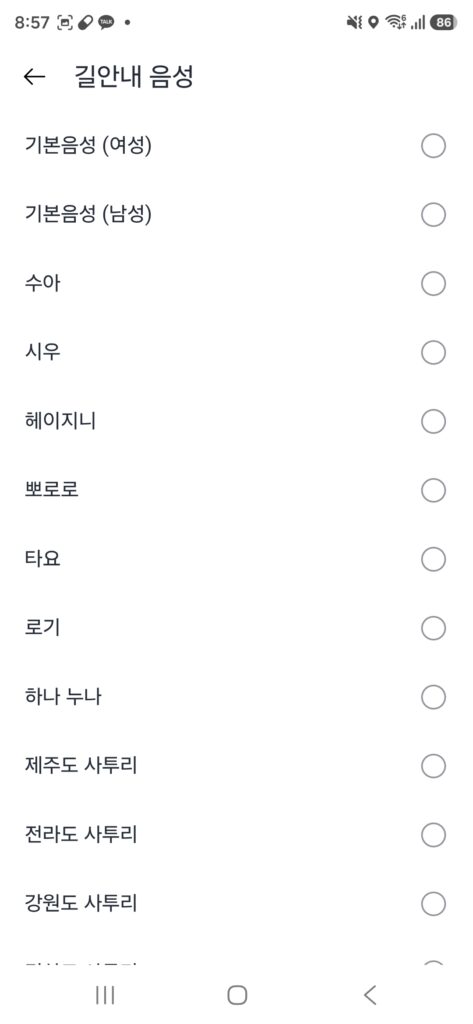
- Scroll down. You’ll pass a long list of Korean voices and regional dialects first — there are even fun character voices like Pororo (뽀로로) and Tayo (타요) if you want to have some fun with it.
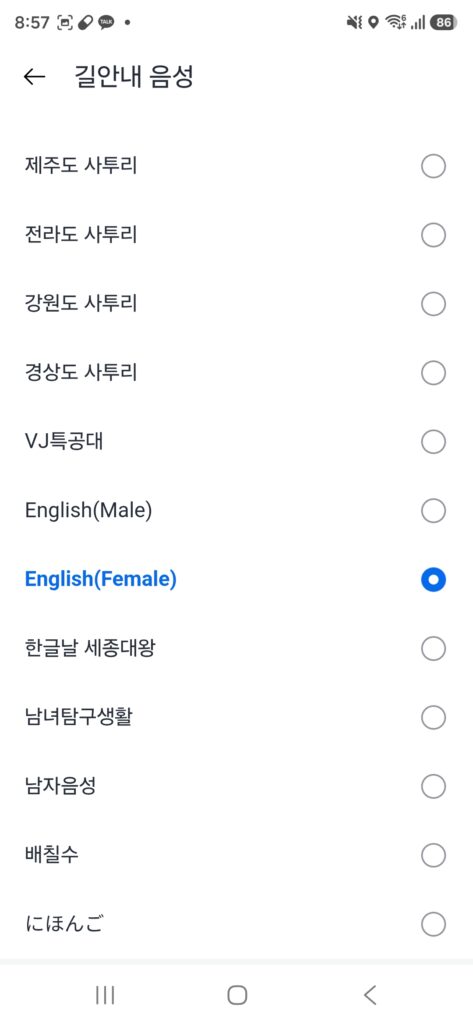
- Keep scrolling and you’ll find English (Male) and English (Female) near the bottom. Tap whichever one you prefer — I went with English (Female).
That’s it. Turn-by-turn guidance will now be spoken in English, even though the on-screen menus stay in Korean. In practice this isn’t a big deal — the distance, time, and turn arrows on screen are all numbers and icons anyway, so it’s easy to follow regardless of language.
Bonus: you don’t even need to read Korean to start a route
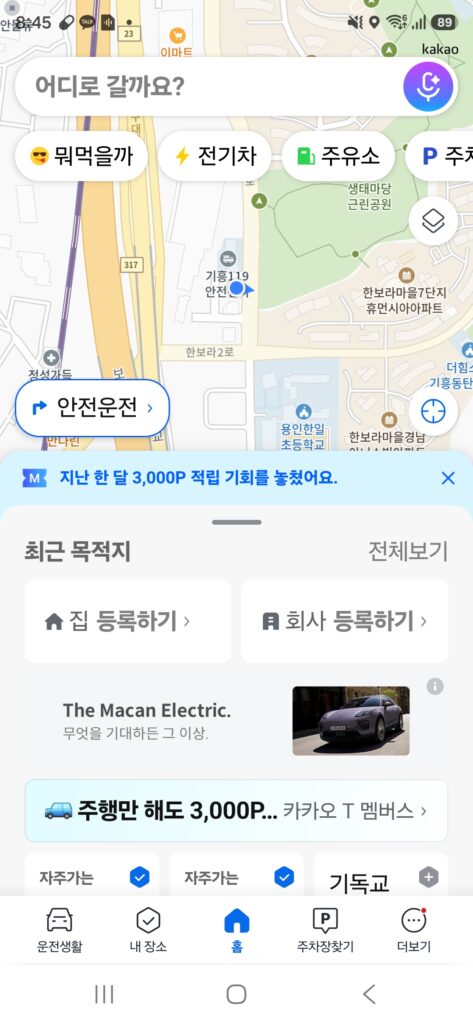
The best part of Kakao Navi for non-Korean speakers is the microphone button on the home screen. Tap it, and Kakao Navi will listen for your destination.

You’ll see suggested voice commands pop up, things like “guide me home,” “find a parking lot,” or “directions to Gimpo Airport.” Just say your destination out loud — or have a Korean-speaking friend say it for you — and Navi starts guiding you immediately. No typing, no reading Korean menus required.
Kakao Map: Switching the Whole App to English
Kakao Map is the one you’ll use for basically everything that isn’t driving — walking routes, subway transfers, bus timing, taxi fare estimates. Unlike Navi, it actually has a full English interface, so once you flip the setting, the whole app changes over.
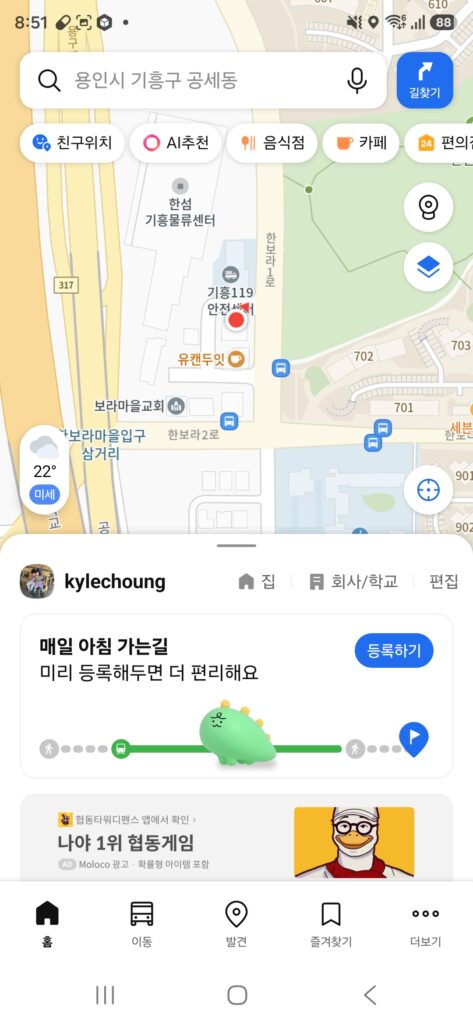
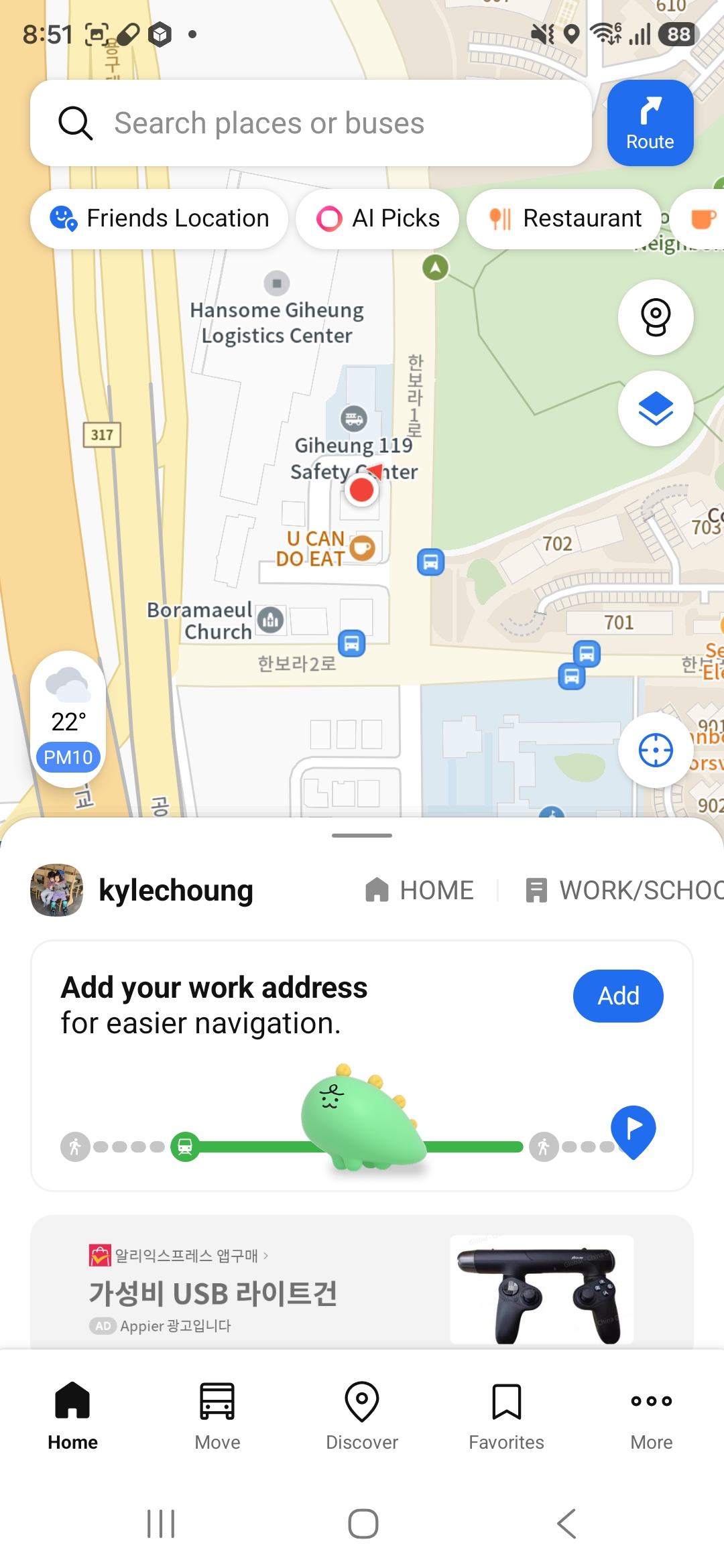
Here’s what the home screen looks like by default, in Korean.
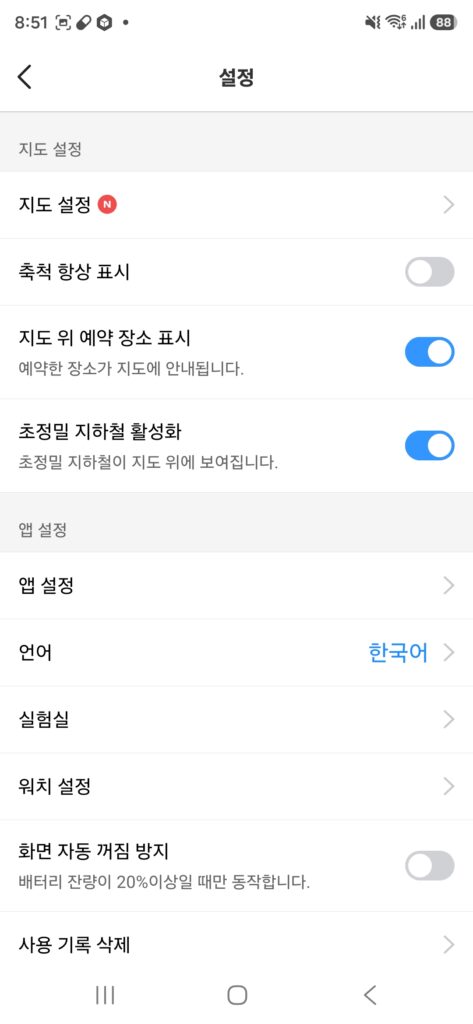
- Tap the gear icon to open Settings, then scroll down to App Settings (앱 설정) and find Language (언어). By default it’s set to Korean (한국어).
- Tap it and select English.
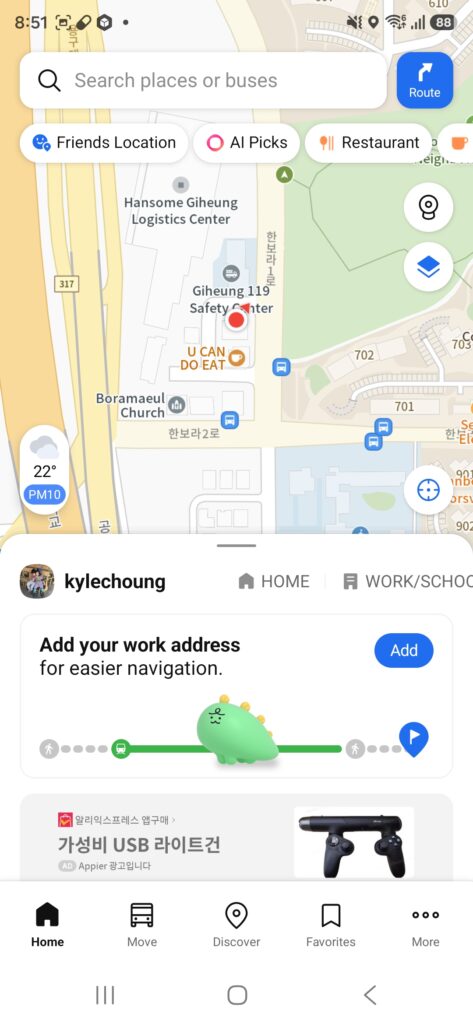
Once that’s done, the search bar, quick filters, and menus all switch over to English, along with place names.
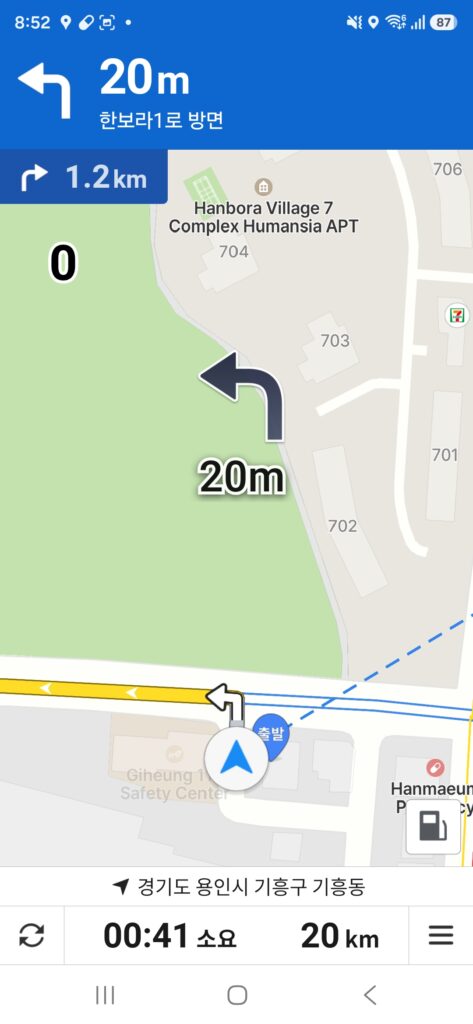
Even the turn-by-turn directions come through in English — distances, street names, and building names included.
Why Kakao Map is genuinely useful for getting around
Once it’s in English, Kakao Map gives you route options tailored to however you’re actually getting somewhere in Korea — subway, bus, taxi, or on foot — and picks the best combination depending on the situation. That kind of multi-modal, transit-aware routing is exactly what Google Maps struggles with here, but it’s what Kakao (and Naver) built their apps around from day one.
Kakao Map and Kakao Navi vs. Google Maps
In Korea, the native apps just work better — more accurate directions, live traffic and transit data, and business listings that are actually up to date. Naver Map is the other solid local option, but if you’re already using KakaoTalk (and you will be, since basically everyone in Korea does), it makes sense to stick with Kakao’s ecosystem — Kakao Map, Kakao Navi, Kakao T for taxis — since they’re all connected and sync with your Kakao account.
Quick recap:
Kakao Navi → More → Navigation Settings → Guide Voice → English (Male/Female). Or just tap the mic and say your destination.
Kakao Map → Settings → Language → English.
Frequently Asked Questions
Do I need to create a Kakao account to use Kakao Map or Kakao Navi?
No. Both apps work for basic search and navigation without signing in. Creating a free Kakao account only unlocks extra features like saving favorite places, syncing between devices, or sharing your live location through KakaoTalk.
Will Kakao Map or Kakao Navi work with an international SIM card or roaming?
Yes. Both apps run on data, so any working internet connection — a Korean SIM, an eSIM, or roaming — is enough. You don’t need a Korean phone number to use the core navigation features.
What if my phone’s system language isn’t set to Korean or English?
Kakao Map will still let you manually switch the app language to English from its own settings menu, regardless of your phone’s system language. Kakao Navi’s menus stay in Korean either way, but the voice guidance can still be switched to English the same way described above.
Can I use Kakao Navi if I’m driving a rental car in Korea?
Yes. Kakao Navi isn’t tied to a specific car or license — it just needs your phone mounted where you can see and hear it. Many rental car companies in Korea actually recommend Kakao Navi over their built-in GPS for better accuracy.
Does Kakao Map show real-time bus arrival times?
Yes, and this is one of its biggest advantages over Google Maps. Kakao Map pulls live bus location data, so you can see exactly how many minutes until your bus arrives at a specific stop, not just a scheduled time.
Can I share my location with someone through KakaoTalk?
Yes. From Kakao Map, you can send your current location or a specific destination directly into a KakaoTalk chat. This is especially useful for meeting a delivery driver, a repair technician, or a friend who doesn’t know the area.
Related guides
- Delivery Apps in Korea: Coupang, Baemin, and Coupang Eats
- Emergency Numbers in Korea for Foreign Residents
- What to Do After Moving into a Korean Apartment
About This Blog
This blog is written by someone actually living day to day in Yongin, Gyeonggi-do — not translating information secondhand. Alongside writing these guides, I run a small home repair and interior business (JH Housing) serving the Yongin, Suwon, and Dongtan area, which means the everyday problems of living here — navigation, deliveries, repairs, paperwork — are things I deal with firsthand, not just research.
The goal of this site is simple: practical, tested information for foreigners living in or visiting the Yongin–Suwon–Dongtan area of Korea.
More guides at https://simplelifeinkoreatips.com
Need Help in Korea?
If you’re settling into the Yongin, Suwon, or Dongtan area and need reliable home repair or maintenance services, feel free to reach out directly.
Phone: 010-8775-5384
KakaoTalk ID: kylechoung
JH Housing handles everything from small repairs to interior renovations, while this blog shares the practical, everyday knowledge that makes living in Korea easier.